How to Track AI Traffic for Free
Summary
GA4 can now help you track AI-driven visitors and citations from ChatGPT, Bing Copilot, and AI Overviews. Tag AI referral sources, monitor traffic patterns, and measure how your site performs in AI Search.
AI tools like ChatGPT, Perplexity, and Gemini are changing how people discover websites. But for many business owners and marketers, there’s one big question:
How do I know if AI is actually sending traffic to my website?
Platforms like Google Analytics 4 (GA4) weren’t designed to track AI bots or their influence. But that doesn’t mean you’re flying blind. With a few custom tweaks, you can start tracking traffic driven by AI citations and summaries and make smarter decisions about your content strategy.

Let’s break it down.
Why You Can’t Rely on GA4 Out of the Box
GA4 is a powerful tool, but it wasn’t built with AI-driven referrals in mind. Here’s why:
- AI bots don’t behave like real users. They don’t trigger standard events or sessions.
- Referrals from AI platforms are indirect. Chatbots don’t always link directly they describe or summarise, and users click through if curious.
- Default reports don’t separate AI domains. You’ll miss important insights unless you customise.
But with a little setup, you can track human clicks that come from AI platforms like chat.openai.com or perplexity.ai.
Setting Up AI referral Tracking in GA4
The best way to track AI referrals in GA4 is by creating a Custom Channel Group. This approach:
There are a couple of ways to do this but Creating a Custom Channel Group is tge most robust and recommended method, as it allows you to see this data as a separate channel in your standard GA4 reports on an ongoing basis. Plus it updates your standard reports automatically.
1 Create a Custom Channel Group in GA4
- Navigate to “Admin”: Click the “Admin” gear icon in the bottom-left corner of the GA4 interface.
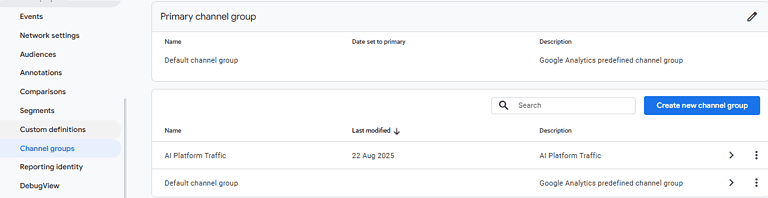
- Go to “Channel Groups”: In the “Data Display” column, select “Channel Groups.”
- Create a New Channel Group: Click “Create new channel group.” Give it a name like “AI Platform Traffic.”
2 Add a New Channel
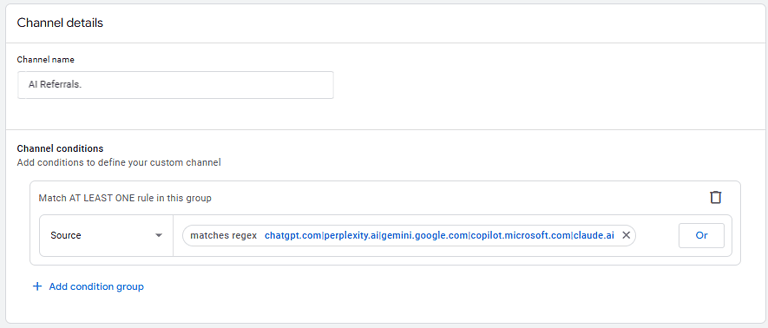
- Click “Add new channel” and give it a name like “AI Referrals.”
- Define the Rules: Set the conditions for this new channel.
- For “Dimension,” select “Source.”
- For “Match type,” select “matches regex.”
- For “Value,” enter your regex pattern for AI domains (e.g.,
chatgpt.com|perplexity.ai|gemini.google.com|copilot.microsoft.com|claude.ai). - Click “Save channel.”
3 Reorder the Channels
- Move “AI Referrals” above the “Referral” channel
- Save the Group: Click “Save group” to finalize your changes.
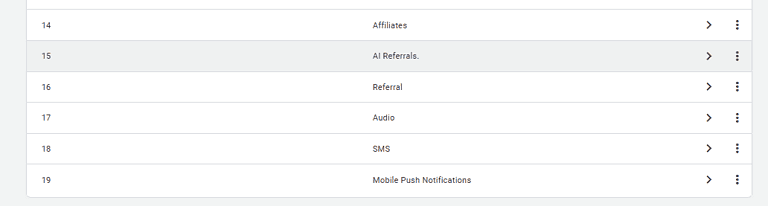
This is a crucial step. The channels are evaluated in a top-down waterfall. By default, AI referral traffic is lumped into the general “Referral” channel. You need to move your new “AI Referrals” channel above the “Referral” channel in the list. This ensures that when GA4 sees a chat.openai.com referral, it attributes it to your new, specific channel before it gets to the generic one.
Don’t forget to add New Chanel Group/Chanel to Traffic Acquisition reports
Once you have created the channel group, you can select it as the primary dimension in your Reports > Acquisition > Traffic Acquisition report. This allows you to see your “AI Referrals” as a distinct channel alongside “Organic Search,” “Direct,” and other traffic sources.
Spotting the Indirect Impact of AI
Not all AI-driven traffic comes through as a referral. Sometimes, the boost is more subtle.
Here’s how to spot it:
- Look for spikes in branded searches. If a chatbot mentions your brand, users may Google it directly.
- Monitor direct traffic to key pages. Especially blog posts or landing pages cited by AI tools.
- Compare timelines. If you see a citation from an AI tool, check if traffic increased shortly after.
While it’s not a perfect science, correlating branded traffic with AI exposure gives you powerful strategic insights.
Why This Matters for SEO and Strategy
Tracking AI-driven traffic helps you:
- Identify content that AI is surfacing (and double down on it)
- Measure visibility beyond search engines
- Justify content investments with data
- Stay ahead of competitors not yet monitoring this channel
As more users rely on AI tools for answers, the websites they cite and summarise will gain an edge. Tracking that influence is now essential.
Let Brighter Websites Set It Up for You
If you’re not confident navigating GA4 or regex, we can help. At Brighter Websites, we offer SEO-first web design, ongoing analytics support, and no-nonsense strategies that work.
We’re based in Ballarat but support businesses across Australia from Sebastopol to Brisbane.
📞 Want to start tracking smarter?
Book a free consult or reach out to us.