

Business Information
Business Information
Configure organisation identity, contact, media, and social profiles used by schema, shortcodes, and Open Graph.
Overview
Doc Status: Well Documented
Agency devs / future maintainers, Business Owners, Web Designers
Summary
Business Information is the single source of truth for entity data SCOS reuses everywhere: schema markup, contact shortcodes, Open Graph, and social profile links. Fields cover organisation type, business name, category aligned with Google Business Profile, VAT/ABN, founding date, contact channels, and media assets. Complete this section before tuning schema templates or local business output.
Table Of Contents
Fill entity identity and contact fields before schema or social modules — other SCOS outputs read from here.
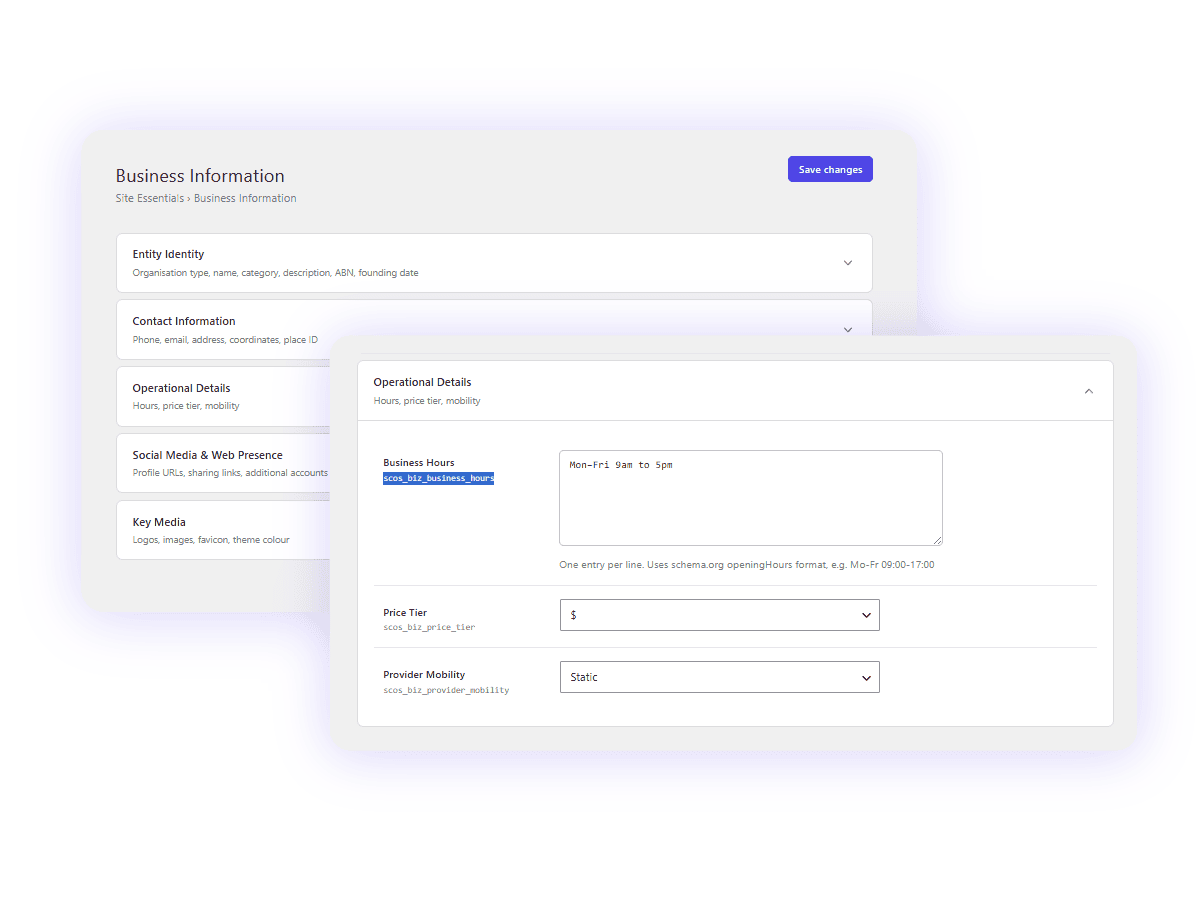
Entity Identity
Define your organization type, business name, category, and core description for schema markup.
| Organisation Type | Local Business Organization Person | [business_info setting="organisation_type"] |
| Business Name | [business_info setting="business_name"] | |
| Business Category | Same as Primary Category on your Google Business Profile | [business_info setting="business_category"] |
| Description | Service Description or Organization Bio | [business_info setting="service_description"] |
| Business Identification | VAT ID or ABN. Search: https://abr.business.gov.au/ABN/ | [business_info setting="abn"] |
| Founding Date | ISO 8601 format: YYYY (e.g. 2020) or YYYY-MM or YYYY-MM-DD | [business_info setting="founding_date"] |
| Founder Contact Name | Full name (first and last) of the founder or primary contact | [business_info setting="founder_contact_name"] |
Contact Information
Enter your contact and location information below.
| Primary Phone Number | [business_info setting="phone_number"] | |
| Email Address | [business_info setting="email"] | |
| DPO / Privacy Contact Name | Data Protection Officer or Privacy Contact (if different from founder) | [business_info setting="contact_name"] |
| Contact Type | — Select –Customer SupportTechnical SupportBilling SupportSalesEmergencyOnly for Organizations | [business_info setting="contact_type"] |
| Contact Option | NoneToll FreeHearing Impaired SupportedOnly for Organizations | [business_info setting="contact_option"] |
| Address | [business_info setting="address"] | |
| City | [business_info setting="city"] | |
| State | [business_info setting="state"] | |
| Postcode | [business_info setting="postcode"] | |
| Country | [business_info setting="country"] | |
| Country Code | e.g. AU | [business_info setting="country_code"] |
| Latitude | Use numerical coordinate like -37.00000. Find: https://latitude.to/ | [business_info setting="lat"] |
| Longitude | Use numerical coordinate like 145.00000 | [business_info setting="long"] |
| Google Place ID | Find your Local Verified Location Business (no place ID for service area businesses) | [business_info setting="place_id"] |
Operational Details
Define your service area, mobility, hours and pricing tier.
| Business Hours | [business_info setting="business_hours"] | |
| Price Tier | $$$$$$$$$$ | [business_info setting="price_tier"] |
| Provider Mobility | StaticDynamic | [business_info setting="provider_mobility"] |
| Area Served | [business_info setting="area_served"] | |
| Target Market Area Of Specialisation | [business_info setting="service_area"] |
Social Media & Web Presence
Paste full URLs to your social profiles and sharing links.
| [business_info setting="social_link_facebook"] | ||
| X / Twitter | X needs to be Username not full URL | [business_info setting="social_link_twitter"] |
| [business_info setting="social_link_instagram"] | ||
| YouTube | [business_info setting="social_link_youtube"] | |
| [business_info setting="social_link_linkedin"] | ||
| [business_info setting="social_link_pinterest"] | ||
| Google Maps Share | Search your business, click “Share” next to Save under your business name, copy link | [business_info setting="google_maps_share"] |
| Knowledge Panel Share | If you have a knowledge panel, get the share link and add it here | [business_info setting="knowledge_panel_share"] |
| Google REview Link | [business_info setting="social_link_google_review"] | |
| Additional Account URLs | One URL per line | [business_info setting="additional_account_urls"] |
Business Media
Upload or link to your business logos and images for schema, social sharing, and search results.
| Site Icon (Favicon) | Browser tabs & Google Mobile Search. 512×512px min (1:1 square). Symbol only, bold, simple.To sync with WordPress Customizer site icon, go to Appearance → Customize → Site Identity. | [business_info setting="site_icon"] |
| Business / Org Logo | Google Knowledge Panel & Maps. 1200×1200px min (1:1). Full logo, centered with 20% padding. | [business_info setting="business_logo"] |
| Publisher Logo (Optional) | Google News & Article thumbnails. 600×60px (wide) or 600×600px. Use if main logo is too complex. | [business_info setting="publisher_logo"] |
| Business Image | Local Business verification. 1200×675px min (16:9 or 4:3). Shop front, interior, or team photo. | [business_info setting="business_image"] |
| Mobile Theme Colour | Hex color (e.g. #193b2d) for mobile browser theme | [business_info setting="mobile_theme_color"] |
Note: Site Icon syncs with WordPress Customizer (Appearance → Customize → Site Identity). You can set it here and in the Customizer.
Short codes
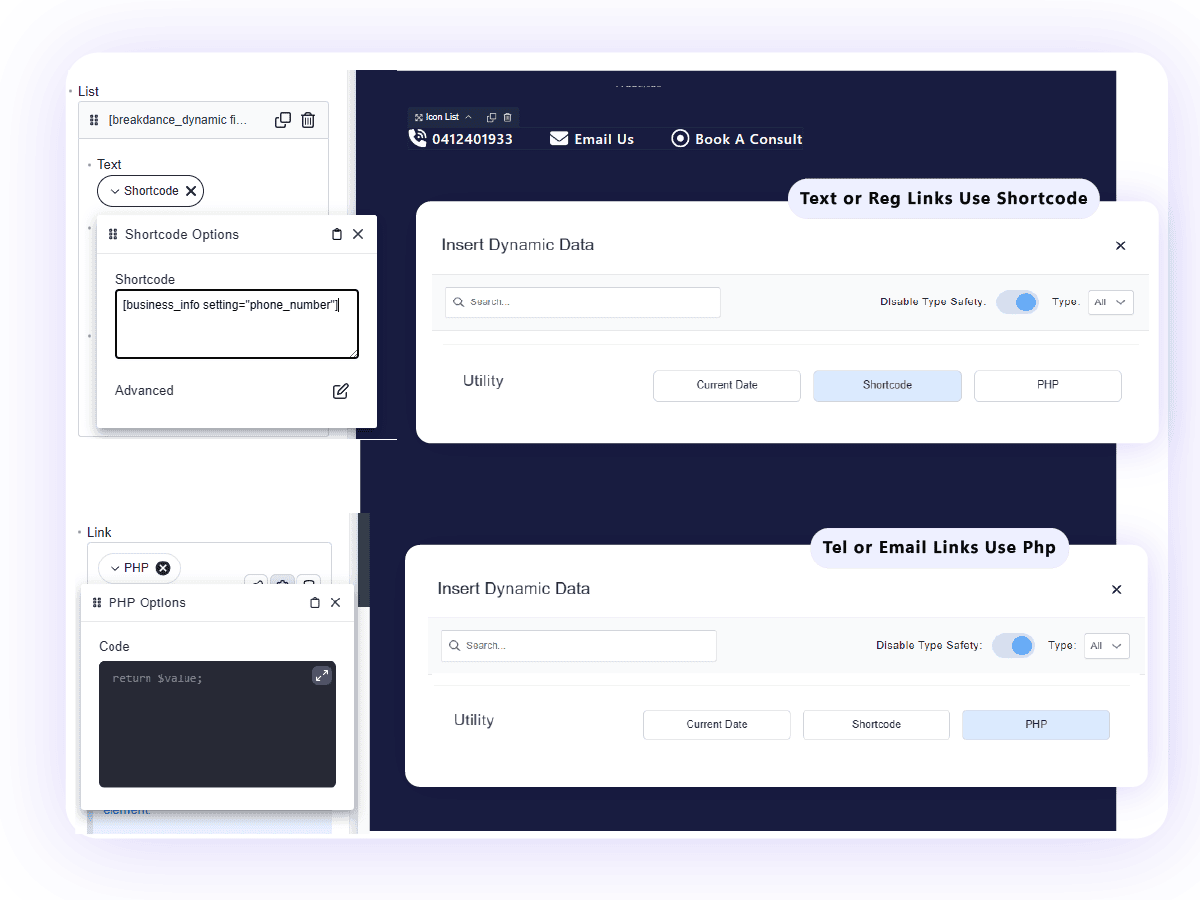
Using short codes for tel, email and other links Requires an extra step
For regular links you just need to select Dynamic data, then select ALL types and disable safety and use the shortcode option.
For Tel and Email links you need to replace the https with mailto or tel like this. You can copy past the below into the shortcode or use the php option.
Short codes for tel & email
[breakdance_dynamic field='phpreturn' params='{"code":"$phone = get_option('scos_biz_phone_number');\n\n// Optional: Clean up any accidental spaces the user might have saved\n$clean_phone = str_replace(' ', '', $phone);\n\nreturn 'tel:' . $clean_phone;"}'][breakdance_dynamic field='phpreturn' params='{"code":"$email = get_option('scos_biz_email');\n\n// Optional: Clean up any accidental spaces the user might have saved\n$clean_email = str_replace(' ', '', $email);\n\nreturn 'mailto:' . $clean_email;"}']PHP Example
$phone = get_option('scos_biz_phone_number');
$clean_phone = str_replace(' ', '', $phone);
return 'tel:' . $clean_phone;
Single & Combined Short Codes
| Uses Current Year, Business Name, ABN (if added) eg/ © 2026 Brighter Websites. All rights reserved. | [site_copyright] |
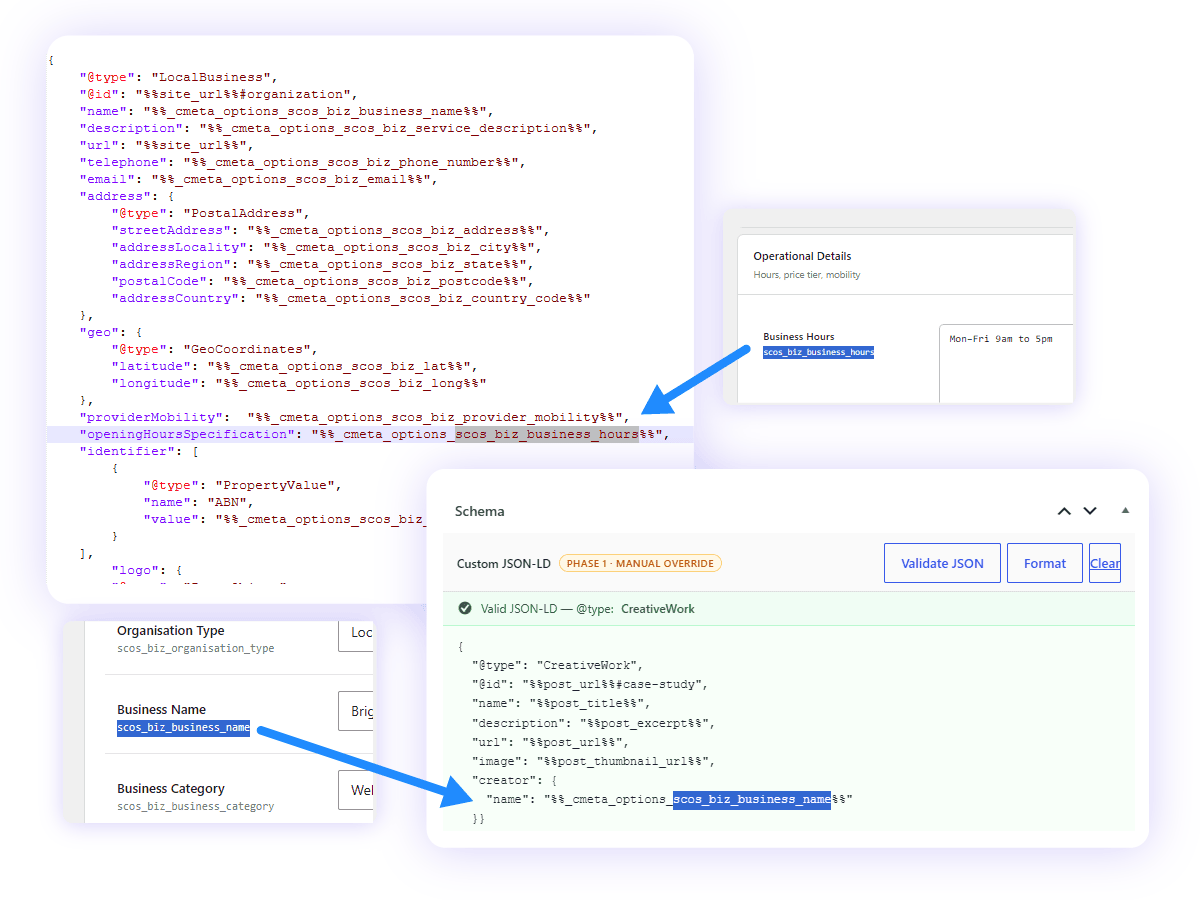
Schema usage
Want to Contribute to SCOS?
SCOS is a Strategic Content Operating System - learn more or contact us on support@brighterwebsites.com.au.