

Social Amplification
Postly.ai Integration
Auto-generate and schedule social posts for Projects via Anthropic captions and Postly.ai when publishing.
Overview
Doc Status: Partially Documented
Agency devs / future maintainers
Summary
Postly.ai integration targets Projects post types: on publish (or via batch tools), SCOS can generate three social captions using Anthropic and schedule them through Postly.ai. AI knowledge documents under wp-content/ai-knowledge/ inform tone. Configure API keys in Settings → AI API Keys and block direct HTTP access to knowledge files on production servers.
Table Of Contents
Requires Anthropic and Postly credentials plus ai-knowledge markdown files. Use batch tools to backfill existing project posts.
Postly.ai Integration for Social Amplification
- Automatically generate and schedule 3 social posts when a Projects post is published.
- Uses Anthropic AI for caption generation and Postly.ai for scheduling.
- Anthropic API key is managed in Settings → AI API Keys.
Change to wp ability –
Schedule Existing Content
Run Social Amplification for existing projects posts. Choose date range or select specific posts.
AI Knowledge Documents for Social Post Generation
Located at /wp-content/ai-knowledge/
- brand-core.md
- vocabulary.md
- social-media.md
- social-media-gmb.md
Block direct HTTP access to ai-knowledge files
Securiting your AI Knowledge docuemnt
/home/domain.com.au/public_html/wp-content/ai-knowledge/.htaccess
# Block all HTTP access — files are read by PHP directly from disk, not via HTTP
<IfModule mod_authz_core.c>
    Require all denied
</IfModule>
<IfModule !mod_authz_core.c>
    Order deny,allow
    Deny from all
</IfModule>
/home/domain.com.au/public_html/.htaccess
# Block direct HTTP access to ai-knowledge files
RewriteRule ^wp-content/ai-knowledge/ - [F,L]
RewriteRule ^wp-content/ai-knowledge/.+ - [F,L]

#BEGIN WordPress
Configure the Postly.ai API Connection
Visit app.postly.ai and get your API Key (Requires API extra) & Workspace ID
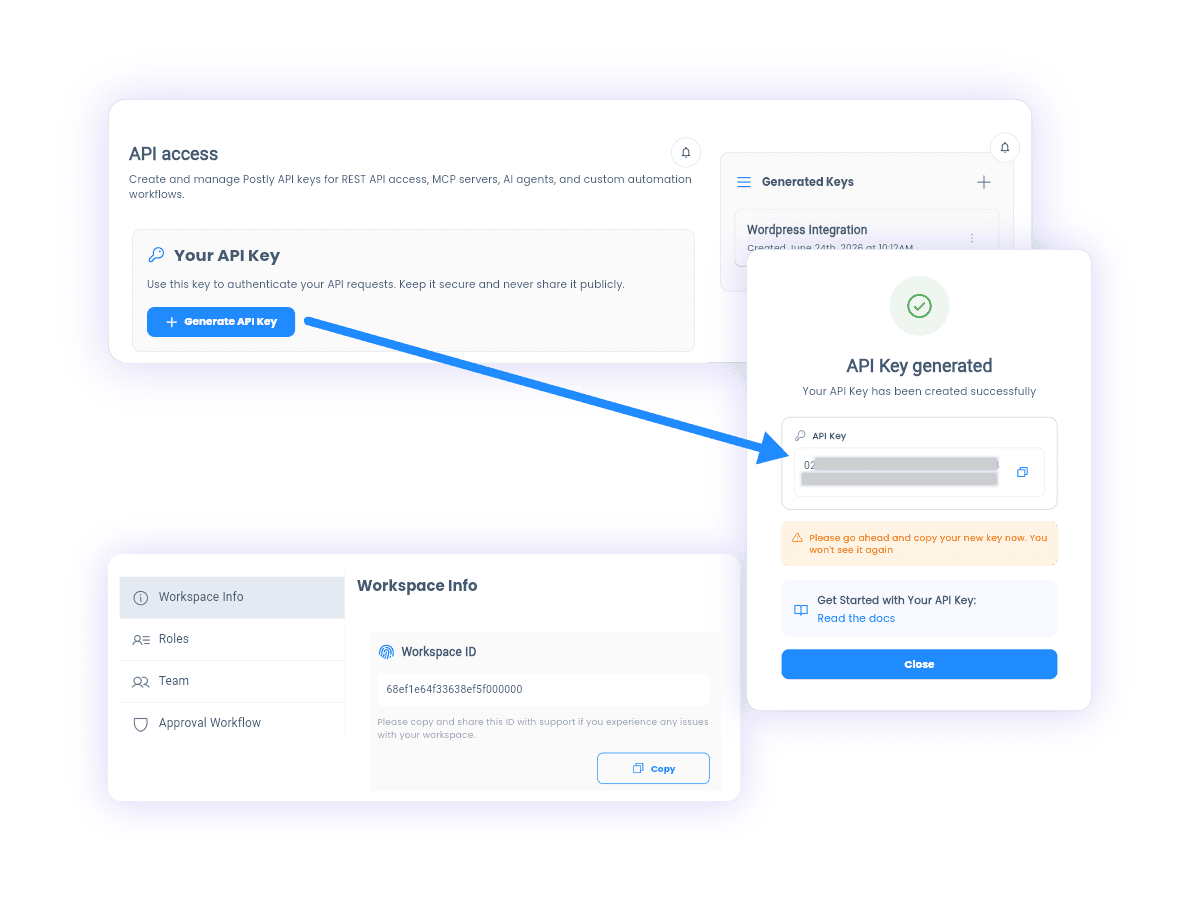
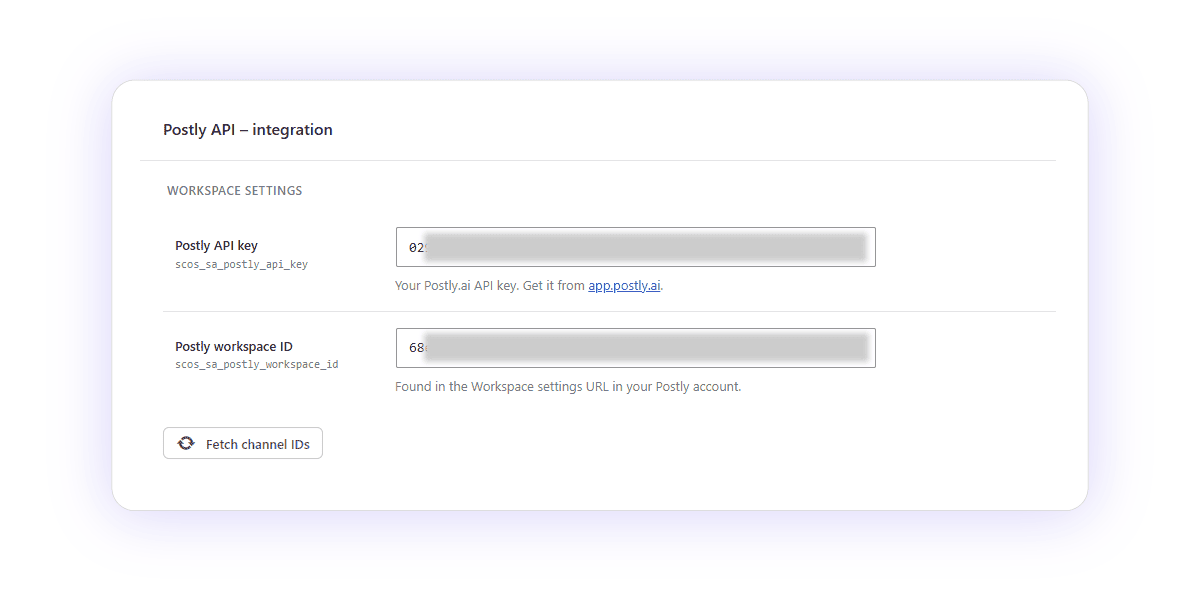
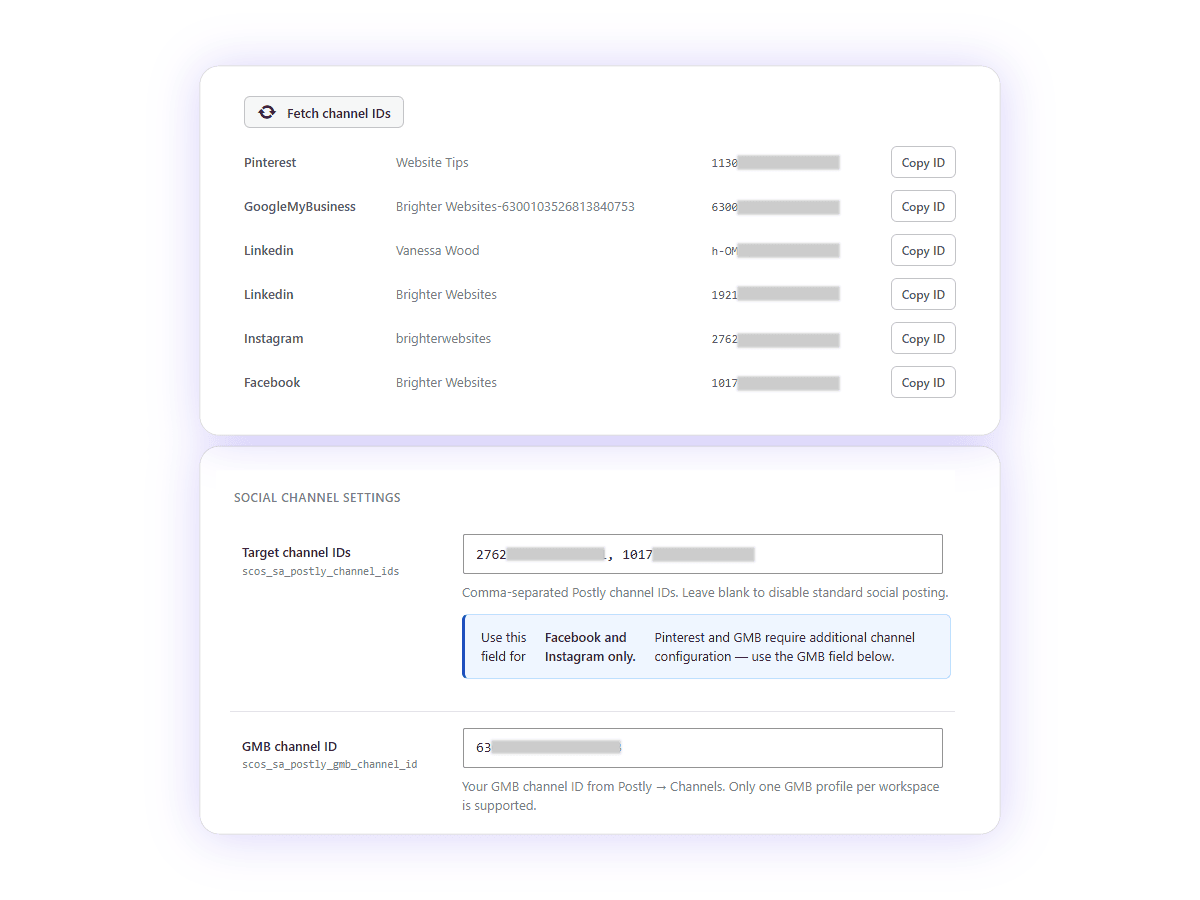
Save and Click Fetch Channel Ids, and Add Target Channel IDs
Add An ACF Gallery Field, if you have one, so that images will pull from the gallery. Otherwise the featured image (and attachment IDs will be used)
If the images already exist in media library, and then added to the post default editor, (as opposed to being added AND uploaded while the post is being edited, it may not “attach”, to the post and pull through correctly. The ACF fields (gallery or image) can be used as a connector, so that postly has a source of images to pull from.
Optionally the images/gallery can be used as dynamic variables on your single page or not.
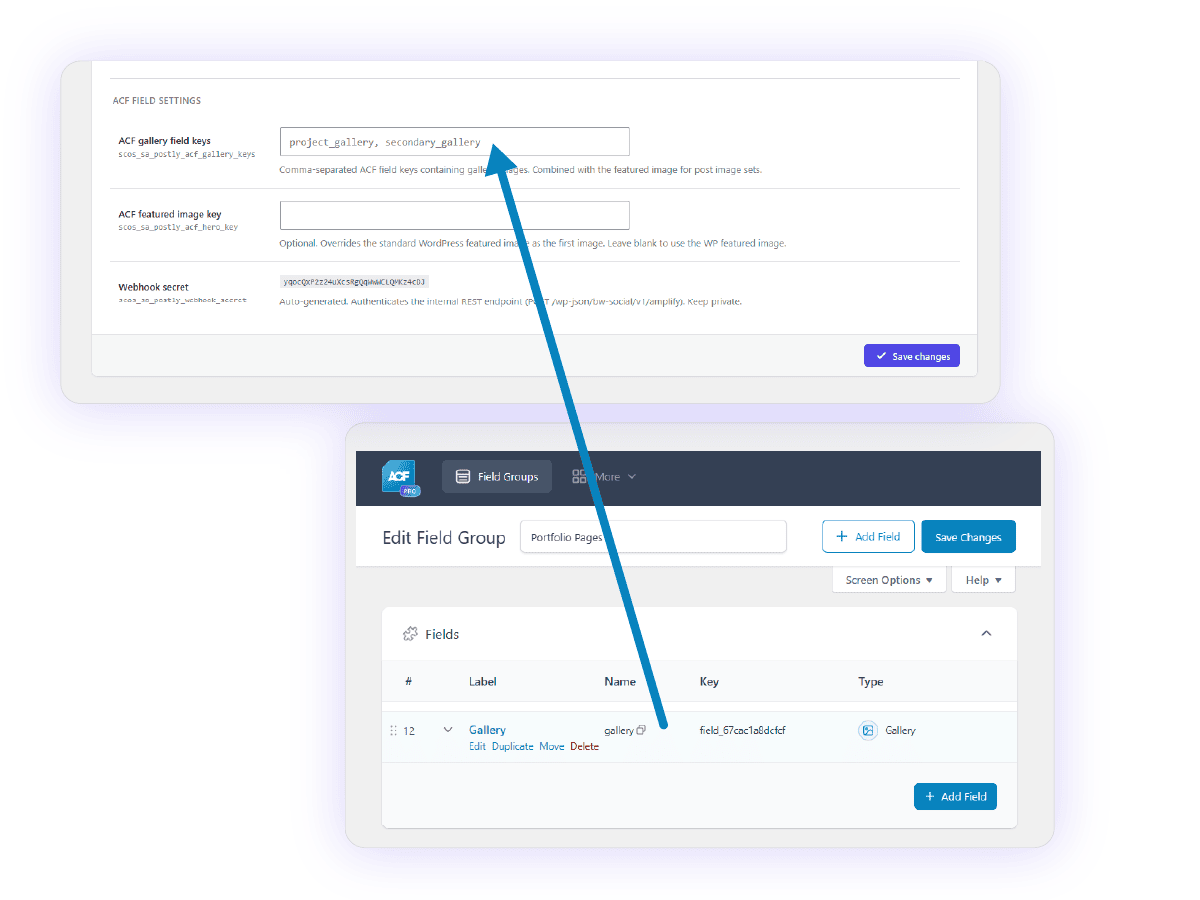
Configure the Postly.ai API Connection
Single Post Amplify / Re-amplify is pressed
1. The button click
The meta box JS (meta-box.js) sends a WordPress AJAX POST to admin-ajax.php:
action: scos_sa_amplify
post_id: 12345
nonce: [wp nonce]
That AJAX handler calls Amplification_Engine::run($post_id).
2. Engine gathers post data
From the WP database for that post ID:
| Data | Source |
|---|---|
title | get_the_title() |
excerpt | post_excerpt field, OR first 40 words of post_content if blank |
permalink | get_permalink() |
shortlink | YOURLS API (if configured + slug saved on post) — becomes permalink?utm_source=social_media&utm_medium=social&... |
content_type | BW_Content_Type_Helper if available, otherwise post_type |
3. Images collected
- WP featured image (
largesize) - Optional: ACF featured image key override (from settings)
- Optional: ACF gallery field(s) (comma-separated field keys from settings)
- Deduplicated
Then split into 3 image sets:
- ≥5 images: Post 1 = first 4, Post 2 = last 4, Post 3 = random 4
- <5 images: all three posts get the same set
4. Call to Claude (standard social — Facebook/Instagram)
What’s read from disk (wp-content/ai-knowledge/):
brand-core.md— brand voice, tone, personalityvocabulary.md— approved/banned wordssocial-media.md— platform rules (length, hashtags, emoji policy etc.)
What’s read from DB:
scos_biz_business_name— e.g. “Brighter Websites”scos_biz_service_description— e.g. “WordPress web design agency”
System prompt sent to Claude:
You are a social media copywriter for Brighter Websites — WordPress web design agency.

Before writing anything, apply the following guidelines precisely:

[BRAND CORE]
<full contents of brand-core.md>

[VOCABULARY]
<full contents of vocabulary.md>

[SOCIAL MEDIA RULES]
<full contents of social-media.md>

Return valid JSON only. No preamble, no explanation, no markdown fences.
The JSON must have exactly these keys: "post_1", "post_2", "post_3". Each value is a complete, ready-to-publish social media caption string.
User prompt sent to Claude:
Create 3 social media captions for this project:

Title: [post title]
Description: [excerpt]
Link: [shortlink or permalink]

post_1: Storytelling angle — draw the reader into the project.
post_2: Results / outcome angle — focus on what was delivered and why it holds up.
post_3: Behind-the-scenes / process angle — tease the craft or a specific build decision.

Each caption: 2–4 sentences, link included naturally, 3–5 hashtags at the end.

Respond with ONLY this exact JSON structure, no other text:
{"post_1": "caption one here", "post_2": "caption two here", "post_3": "caption three here"}
Model: claude-haiku-4-5-20251001 (or whatever’s saved in bw_anthropic_model). Max tokens: 1500.
Claude returns:
{
  "post_1": "Full ready-to-post Facebook/Instagram caption...",
  "post_2": "Different angle caption...",
  "post_3": "Third angle caption..."
}
5. Call to Claude (GMB — separate call)
System prompt uses brand-core.md + vocabulary.md + social-media-gmb.md (not social-media.md). GMB has stricter rules — no URLs, no hashtags, 150–300 chars.
User prompt asks for {"gmb_caption": "..."} only.
6. Images uploaded to Postly CDN
For each image URL, a POST to:
POST https://openapi.postly.ai/v1/files/upload-from-url

{ "url": "https://yoursite.com/wp-content/uploads/..." }
Returns a Postly-hosted CDN URL. This is done per image, per post slot.
7. 3 standard posts scheduled in Postly
One API call per post slot. JSON sent to Postly:
POST https://openapi.postly.ai/v1/posts
POST https://openapi.postly.ai/v1/posts
{
  "text": "Full caption from Claude (post_1 / post_2 / post_3)",
  "workspace": "your-workspace-id",
  "target_platforms": "channel_id_1,channel_id_2",
  "media": [
    { "url": "https://cdn.postly.ai/...", "type": "image/jpeg" },
    { "url": "https://cdn.postly.ai/...", "type": "image/jpeg" }
  ],
  "one_off_schedule": {
    "one_off_date": "2026-06-24",
    "time": "14:30",
    "timezone": "Australia/Melbourne"
  }
}
Scheduling offsets
each at a random time within your configured publish window (e.g. 09:00–17:00).
- Post 1 = now+60min,
- Post 2 = +42 days,
- Post 3 = +84 days,
8. GMB post scheduled in Postly
Similar but uses GMB-specific platform_settings:
{
  "text": "",
  "workspace": "your-workspace-id",
  "target_platforms": "your-gmb-channel-id",
  "platform_settings": [{
    "identifier": "googleMyBusiness",
    "type": "update",
    "language_code": "en-AU",
    "summary": "GMB caption from Claude",
    "call_to_action": "learn_more",
    "call_to_action_url": "https://yoursite.com/post-slug?utm_source=social_media&..."
  }],
  "media": [{ "url": "https://cdn.postly.ai/...", "type": "image/jpeg" }],
  "one_off_schedule": { ... }
}
End result
- 3 posts queued in Postly (Facebook + Instagram, or whatever channel IDs are configured)
- 1 GMB post queued
- A log entry saved to
scos_sa_amplify_logWP option with post ID, timestamps, Postly IDs, and status for each slot - The meta box shows a table of scheduled slots with their Postly IDs
WP CLI Commands to Trigger Social Posts
wp bw-social backfillRegistered in SocialAmplification_Module.php line 88, implemented in CLI/Backfill_Command.php.
What it does: Finds published projects posts that haven’t been amplified yet, builds a Mon/Wed/Fri spread calendar (checking Postly’s existing scheduled posts to avoid clashes), and schedules them via the Postly API. GMB posts are handled on a separate Tue/Thu calendar if se_postly_gmb_channel_id is configured.
Full options
| Flag | Description | Default |
|---|---|---|
--before=<date> | Only include posts published on or before this date (YYYY-MM-DD) | Today |
--post-from=<date> | Only include posts published on or after this date (YYYY-MM-DD) | No minimum |
--schedule-from=<date> | First Postly slot must fall on or after this date | Tomorrow |
--slot-gap-days=<n> | Minimum calendar days between consecutive slots in this run | 0 (pack tightly) |
--limit=<n> | Max number of posts to process | 3 |
--dry-run | Preview what would happen — no API calls made | Off |
Examples
# Basic — next 3 unprocessed projects, slots from tomorrow
wp bw-social backfill
# Date-filtered batch of 5
wp bw-social backfill –post-from=2025-01-01 –before=2025-12-31 –limit=5
# Space slots at least a week apart, starting May 1, preview only
wp bw-social backfill –schedule-from=2026-05-01 –slot-gap-days=7 –limit=5 –dry-run
Required settings (will error if missing)
| Option key | Description |
|---|---|
bw_anthropic_api_key | Anthropic API key (caption generation) |
bw_postly_api_key | Postly API key |
bw_postly_workspace_id | Postly Workspace ID |
bw_social_webhook_secret | Webhook secret |
Optional: se_postly_gmb_channel_id — if set, GMB posts are also scheduled on Tue/Thu slots.
The REST endpoint (Amplification\REST_Endpoint) and the backfill REST endpoint (Backfill_Endpoint) are separate HTTP-based triggers, not CLI commands.
Want to Contribute to SCOS?
SCOS is a Strategic Content Operating System - learn more or contact us on support@brighterwebsites.com.au.