If your website isn’t showing up on Google, it’s often due to indexing or crawling issues. In this guide, we’ll walk through real troubleshooting steps, including a case study, to help get your website back into search results.
Understanding Indexing & Crawling
Before we dive into fixes, it’s key to understand the basics:
Crawling: Search engine bots (like Googlebot) visit your website to scan its content and structure.
Indexing: After crawling, pages are stored in Google’s index and may appear in search results.
If Google can’t crawl or index your pages, your site won’t rank no matter how good your content is.
Why Your Site Might Not Be Indexed
Some common reasons include:
noindex tags in the meta or robots.txt file
Blocked access to bots
Poor internal linking or missing sitemap
Duplicate or plagiarized content
Slow page speed or mobile usability issues
Case Study: Solving Indexing Issues
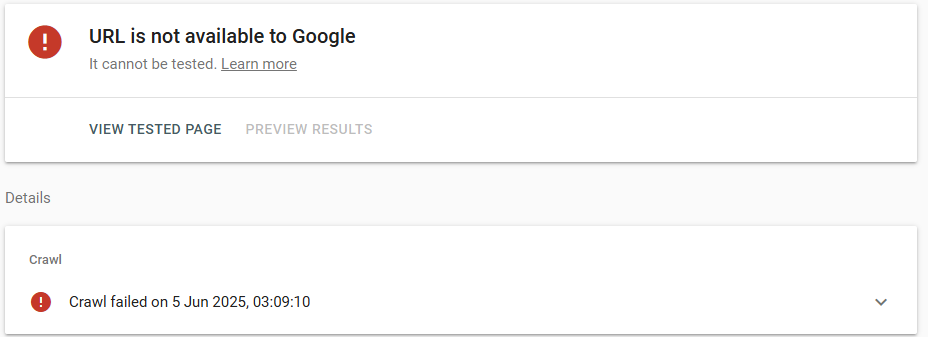
We recently helped a client whose website wasn’t appearing in search results.
Want to know how your current site stacks up in the age of AI search? Request a Free Quick AI Ready Search Assessment I’ll show you where you stand in AI rankings, and what you can fix fast.
Awesome, this really helped! ? I’ve been using Search Console but still get confused by the coverage errors. Is there a way to tell if it’s a real issue or just a temporary thing?
Vanessa Woodsays:
Great question, Oscar!
Sometimes those coverage errors are just temporary (like from crawl delays), but others need fixing. If the error persists for more than a few days, it’s worth checking the page source and running the URL Inspection tool again.
is blog content still one of the best ways to boost SEO in 2025
I see people talk about “intent based keywords” can you explain what that is in simple terms?
and is it better to optimise one page at a time, or do a full site update all in one go?
Vanessa Woodsays:
Great questions! ? Let me break it down for you:
1. Is blog content still one of the best ways to boost SEO in 2025?
Absolutely — yes. Well-written, helpful blog posts are still one of the strongest SEO tools, especially when they answer real user questions. Google loves fresh content that matches what people are actually searching for.
2. What are “intent-based keywords”?
Basically, it’s about figuring out why someone is searching.
For example:“Buy sneakers online” = they’re ready to purchase (commercial intent)
“Best sneakers for walking” = they’re researching (informational intent)
Targeting the right intent means your content shows up for people at the right stage of their decision.
3. Should I optimise one page at a time or do a full site update?
It depends on your time and setup — but usually, it’s more manageable and effective to optimise one page at a time. That way you can track results, test what’s working, and not get overwhelmed. A full-site overhaul is fine too, just make sure your changes are consistent and well-planned.
paulsays:
Thank you for your sharing.This answered a lot! But a couple things I’m still wondering:
– Is it normal for Google to take weeks to index new pages?
– What’s the difference between “Crawled – currently not indexed” and “Discovered – not indexed”?
– Should I resubmit a page if it’s stuck in that status?
– do you think AI tools help or hurt SEO now? asking coz I been using ChatGPT a bit and not sure if that messes with ranking
Vanessa Woodsays:
Thanks Paul those are great questions!
Yes, it can take weeks for new pages to be indexed, especially if your site isn’t updated frequently or lacks internal links.
“Discovered – not indexed” means Google knows about the page but hasn’t crawled it yet itcould be due to crawl budget or low priority.
If it’s stuck there for more than 10–14 days, resubmitting in Search Console can help give it a push.
If you are still having issues – get in touch with us and we cant help
Thankssays:
if a page is blocked by mistake, does using AI-generated content make it harder to get re-indexed, or does that not matter?how often do you need to update pages for SEO to keep working? monthly or what?
also love the tone of this blog btw!
Vanessa Woodsays:
Great question, “Thanks”! – Thanks for posting
AI-generated content doesn’t prevent indexing as long as it’s unique, useful, and follows Google’s helpful content guidelines. Just be sure the page isn’t being blocked by robots.txt or has a noindex tag accidentally left on.
Google will index AI-written content if it meets quality standards.
E. Wellssays:
Super clear explanation
thank you ?
Quick q: once you fix indexing issues, should you do a reinspection in Search Console, or will Google pick it up again on its own?
Vanessa Woodsays:
Thanks for your comment!
Yes
Once you’ve fixed the issue (like removing a noindex tag or updating your sitemap), it’s a good idea to request indexing in Search Console.
Google will eventually recrawl on its own, but a manual push speeds things up. We implement instant indexing for our clients for both Bing ang Google so when a page is update it automatically hits search console via the Web Indexing API and and tells google to reindex the page.
Comments are closed
Subscribe to our blog
Occasional emails from Vanessa about AI, SEO, Website Marketing for regional service businesses.
Want to Share Your Expertise?
We’re always on the lookout for valuable insights to feature on the Brighter Websites blog. If you’re passionate about web design, SEO, marketing, or small business growth, we’d love to hear from you. Send your research or content ideas to Vanessa at support@brighterwebsites.com.au.
See what we have done
More Articles
Discover more expert insights to the latest Web Design and SEO trends, these curated blog posts are designed to broaden your horizons and spark your imagination.










Oscar says:
Awesome, this really helped! ? I’ve been using Search Console but still get confused by the coverage errors. Is there a way to tell if it’s a real issue or just a temporary thing?
Vanessa Wood says:
Great question, Oscar!
Sometimes those coverage errors are just temporary (like from crawl delays), but others need fixing. If the error persists for more than a few days, it’s worth checking the page source and running the URL Inspection tool again.
Feel free to drop a screenshot via email support@brighterwebsites.com.au if you’re unsure!
Nadia Singh says:
I have some questions
is blog content still one of the best ways to boost SEO in 2025
I see people talk about “intent based keywords” can you explain what that is in simple terms?
and is it better to optimise one page at a time, or do a full site update all in one go?
Vanessa Wood says:
Great questions! ? Let me break it down for you:
Absolutely — yes. Well-written, helpful blog posts are still one of the strongest SEO tools, especially when they answer real user questions. Google loves fresh content that matches what people are actually searching for.
Basically, it’s about figuring out why someone is searching.
For example:“Buy sneakers online” = they’re ready to purchase (commercial intent)
“Best sneakers for walking” = they’re researching (informational intent)
Targeting the right intent means your content shows up for people at the right stage of their decision.
It depends on your time and setup — but usually, it’s more manageable and effective to optimise one page at a time. That way you can track results, test what’s working, and not get overwhelmed. A full-site overhaul is fine too, just make sure your changes are consistent and well-planned.
paul says:
Thank you for your sharing.This answered a lot! But a couple things I’m still wondering:
– Is it normal for Google to take weeks to index new pages?
– What’s the difference between “Crawled – currently not indexed” and “Discovered – not indexed”?
– Should I resubmit a page if it’s stuck in that status?
– do you think AI tools help or hurt SEO now? asking coz I been using ChatGPT a bit and not sure if that messes with ranking
Vanessa Wood says:
Thanks Paul those are great questions!
Yes, it can take weeks for new pages to be indexed, especially if your site isn’t updated frequently or lacks internal links.
“Discovered – not indexed” means Google knows about the page but hasn’t crawled it yet itcould be due to crawl budget or low priority.
If it’s stuck there for more than 10–14 days, resubmitting in Search Console can help give it a push.
If you are still having issues – get in touch with us and we cant help
Thanks says:
if a page is blocked by mistake, does using AI-generated content make it harder to get re-indexed, or does that not matter?how often do you need to update pages for SEO to keep working? monthly or what?
also love the tone of this blog btw!
Vanessa Wood says:
Great question, “Thanks”! – Thanks for posting
AI-generated content doesn’t prevent indexing as long as it’s unique, useful, and follows Google’s helpful content guidelines. Just be sure the page isn’t being blocked by robots.txt or has a noindex tag accidentally left on.
Google will index AI-written content if it meets quality standards.
E. Wells says:
Super clear explanation
thank you ?
Quick q: once you fix indexing issues, should you do a reinspection in Search Console, or will Google pick it up again on its own?
Vanessa Wood says:
Thanks for your comment!
Yes
Once you’ve fixed the issue (like removing a noindex tag or updating your sitemap), it’s a good idea to request indexing in Search Console.
Google will eventually recrawl on its own, but a manual push speeds things up. We implement instant indexing for our clients for both Bing ang Google so when a page is update it automatically hits search console via the Web Indexing API and and tells google to reindex the page.