

Custom Posts & Fields
Documentation slot for SCOS custom post types and ACF fields — page awaiting full guide content.
Summary
This page is reserved for documentation on SCOS-managed custom post types and their ACF field groups. There is no substantive body copy yet — configure CPTs under Site Essentials and refer to Analytics Overview until this guide is written.
Table Of Contents
SCOS ships recommended custom post types asl opt-in, all registered only when their module toggle is on.
Where to manage them: Site Essentials → Recommended Custom Posts & Fields (site-essentials-cpt).
Exception: Post Framing lives under the Social Amplification module, not the CPT toggle cards.
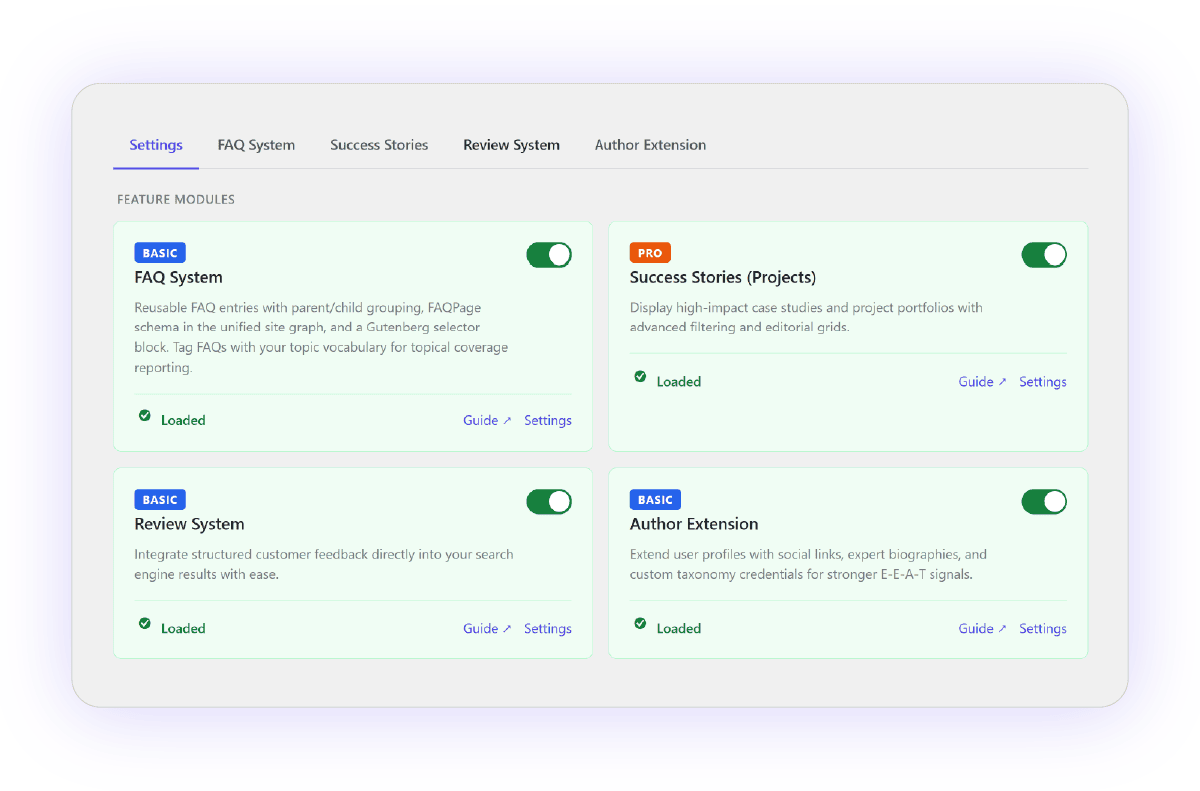
faq — FAQ System
Toggle: enable_faq (CPT module)
Tier: Basic
Description:
Reusable Q&A entries stored as a dedicated CPT. Used for FAQPage schema, Gutenberg FAQ Selector block, Breakdance FAQ elements, and as Search Intent Goals linked from Content Architecture meta.
Special customisations:
- Hierarchical — parent/child FAQ grouping
- Permalinks:
/faq/{topic-slug}/{faq-slug}/via%scos_topic%rewrite tag - Topic taxonomy: uses site-wide
scos_topic(shares CA vocabulary) - Archive: off by default; optional
/faq/archive viascos_faq_archive_enabled - Excluded from front-end search and Yoast sitemap
- Meta:
scos_faq_schema_answer,scos_faq_enable_schema,scos_faq_is_intent_goal(legacy_faq_*dual-written) - Outputs:
[faqs]brighter/faq-selectorGutenberg block, unified schema graph injection - Two REST surfaces: editor-only
site-essentials/v1/faqs*vs externalbrighter-core/v1/faqs(token auth)
projects — Customer Success Stories
Toggle: customer_success_stories (CPT module)
Tier: Pro
Post type slug is always projects — admin labels and URL slug are configurable.
Description:
Case studies / project portfolios. The standard SCOS proof-asset CPT for B2B and service businesses. Feeds social amplification, Airtable sync, and review relationships.
Special customisations:
- Configurable archive slug (
archive_slugoption, defaultprojects) — labels auto-derive from slug - Optional WP Categories and Tags on projects (separate toggles)
- Supports: title, editor, thumbnail, excerpt, revisions
- Author support added by
brighter-corepost-type-enhancements - Full CAR + SEO meta boxes (registered before CA taxonomy cache at
initpriority 16) - Social amplification: primary target for
bw-social/v1/amplifyand backfill - API:
GET /brighter-core/v1/projectwhen CPT exists (GS sites)
bw_reviews — Review System
Toggle: enable_reviews (CPT module)
Tier: Basic
Slug: bw_reviews (legacy — migration to scos_review_* keys planned, not done)
Description:
Structured customer reviews as a queryable SSOT — no public URLs, no archive. Designed for Breakdance loops, shortcodes, aggregate widgets, and schema output. Title field = customer name.
Special customisations:
public: truebutrewrite: false— queryable in BDE/WP_Query, invisible to URLs- Excluded from XML sitemaps via filter
- Taxonomy:
bw_review_platform(Google, Facebook, Trustpilot seeded; per-term logo upload with SVG sanitisation) - Meta: rating, date, date precision, verify URL, schema ID (auto-generated, stable), success outcome, customer detail, featured flag, review excerpt
- ACF relationship to
projects(bidirectional if ACF Extended active) - Shortcodes:
[bw_review_card],[bw_aggregate_review],[bw_review_count],[bw_review_average], plus field-level[bw_review_*] - CSV bulk import from CPT settings → Reviews tab
- Custom BDE elements: SCOS Review Card, Aggregate Review
scos_social_framing — Post Framing
Toggle: Social Amplification module (not a CPT module card)
Replaces legacy: bw_talking_point (one-time DB migration on module activation)
Description:
Admin-only library of AI framing templates for social caption generation. Each “Post Frame” defines tone, hooks, CTAs, and word-count targets per content type. Consumed by Make.com via brighter-core/v1/social-amplification/* endpoints.
Special customisations:
public: false— admin UI only, no front-end URLs- Meta:
scos_sma_pf_content_type,scos_sma_pf_context,scos_sma_pf_example,scos_sma_pf_cta,scos_sma_pf_words_min/max(dual-reads legacy_bw_tp_*) - Hidden taxonomy:
bw_content_type(kept for Make.com / REST backward compat) - Content type options map to
BW_Content_Type_Helperslugs (article, service, case-study, guide, news, etc.) - Legacy
BW_Talking_Pointsin brighter-core skips registration whenSCOS_SA_ACTIVEis defined
Related toggle — not a CPT
Author Extension
Toggle: enable_author_extension (same CPT settings page)
Not a post type — extends WP user profiles with scos_author_* meta (job title, works_for, social links, etc.) for Person schema / E-E-A-T. Lives in brighter-core/includes/class-author-extension.php.
Legacy per-site CPTs — not SCOS-recommended
These are not registered by site-essentials but brighter-core still knows about them on specific client sites:
| Slug | Typical site | SCOS integration |
|---|---|---|
folio | Brighter Websites | API /our-work, social inventory, Airtable sync |
kb | Brighter Websites | API /kb, content-type mapping → guide |
news | Brighter Websites | API /news, Google News sitemap exclusion option |
Registered elsewhere (historically per-site). SCOS endpoints auto-expose them only if the post type exists on that install.
Technical info for dev & super users
- Opt-in model — all recommended CPTs default off; toggling on is what registers the CPT. No toggle = post type does not exist.
- Slug vs label split on
projects— post type is alwaysprojects;archive_slugonly changes URLs and admin labels. bw_reviewsURL paradox —public: true+rewrite: falseis intentional; (so BDE is queryability without crawlable URLs and so can be included in the sitemap exclusion filter.- Legacy key migration status — Reviews (
bw_*), FAQ (dual_faq_*/scos_faq_*), Post Framing (_bw_tp_*/scos_sma_pf_*). MCP/CLI should queryscos_faq_*. - FAQ dual REST architecture —
site-essentials/v1(editor) vsbrighter-core/v1(external token). Stale entries insettings-api.php(/faqs/search,/faqs/exportunder brighter-core) need correction – issue is logged. - CPT ↔ CA integration —
faqmust register atinitpriority 16 (before CA taxonomy association at 20) or it misses CAR/SEO meta boxes. - Per-site legacy CPTs (
folio,kb,news) — document as “client-specific, not SCOS-delivered” so agents don’t expect them on GS/OTC sites. bw-social/v1whitelist gap — if REST API restriction tweak is on, amplify/backfill loopback is not whitelisted (onlybrighter-coreis). Super-user doc should call this out.
Usage guides (general users / clients)
Worth covering in plain language:
- When to enable which CPT — FAQ for schema + intent goals; Projects for case studies; Reviews for trust widgets (not standalone pages); Post Framing only if using social amplification.
- FAQ workflow — standalone FAQ vs embedded via block vs intent-goal stub creation from CA meta box.
- Projects naming — “Success Stories” on one site might be
/work/on another; explain the rename field affects menu labels and URLs. - Reviews are not pages — no URLs, no sitemap; used in loops/widgets only. CSV import path and required columns.
- Featured reviews + platform logos — how aggregate widget and review cards pull data.
- Post Framing for non-technical users — what a “frame” is, how content type selection affects Make.com output, don’t edit unless running social automation.
- Author Extension — when to enable (multi-author publishing, E-E-A-T), where fields appear (Users → Profile), link to schema Person output.
Other notes.
- All recommended CPTs get CAR + SEO meta boxes when CA/SEO modules are active
- Sitemap behaviour differs per CPT (FAQ excluded, Reviews excluded, Projects included when public)
- Breakdance integration points — FAQ block filter, Review Card element, project loops
What CPT SCOS does not provide + Why
Services CPT
Instead recommended approach is to use Standard WP Pages (for small to med service or or productised services (non-WooCommerce) services/service-name or just service-name and set intent as commercial/decision support and purpose (scos_ca_purpose) as service (term slug is service-page)
SCOS uses post meta for purpose/intent rather than taxonomies or CPTs — this keeps the data model flat and portable. The tradeoff is Breakdance’s UI taxonomy condition won’t see it directly, so use Custom PHP condition instead.
Use Breakdances Custom PHP condition. (or you could match on post title if you only have a few and not likely to want to add more service pages),
php
global $post;
if (!$post) return false;

$purpose = get_post_meta($post->ID, 'scos_ca_purpose', true);
return $purpose === 'service-page';
For product-page template, same pattern:
php
global $post;
if (!$post) return false;

$purpose = get_post_meta($post->ID, 'scos_ca_purpose', true);
return $purpose === 'product-page';
Location setting — set it to “Single / Pages” not “Single / All Singles” so the PHP condition only fires against standard pages, not every post type on the site.
Priority — if you have multiple page templates, the service-page template should have a lower priority number than your generic page fallback so it takes precedence when the condition matches.
Portfolio
Rename use the rewrite options in success stories/projects
Others:
KB/News for site-specific builds use ACF