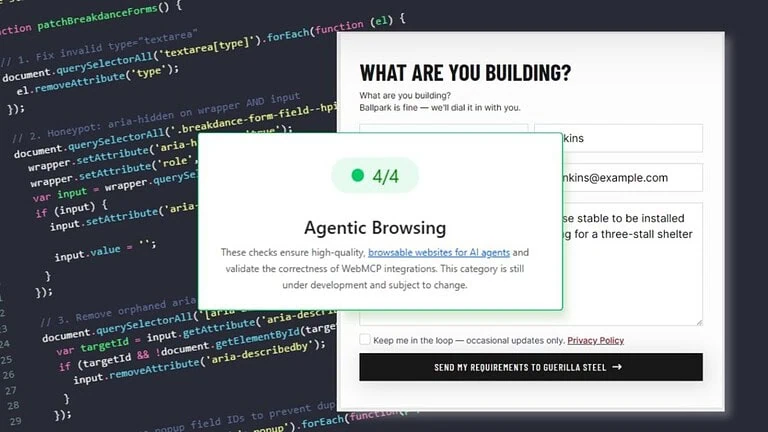
To make a contact form compatible with AI agents and WebMCP, you need to add three attributes to your form: toolname, tooldescription, and toolparamdescription on each input field. If you're using Breakdance on WordPress, there's no built-in setting for this yet — the workaround is to inject these attributes by closing the HTML ID field early and appending them directly. A small JavaScript patch then handles cleanup tasks like fixing invalid attributes, namespacing duplicate form IDs, and managing honeypot fields.
Table Of Contents
I ran Chrome’s new Agentic Browsing audit on a WordPress site built with Breakdance and solved most of the problems I was expecting.
I already had a slightly love–hate relationship with Breakdance forms. They’re genuinely good to work with. Fast to build, user friendly, lots of customisation. Lighthouse and accessibility checks would throw the occasional minor warning. But in practical terms? Nothing was on fire. Leads from the forms worked perfectly. Enquiries came through. Automations fired. People used them without issues.
The problem was really that it wasn’t technically perfect – little W3C HTML issues sitting around in the background. And that annoyed me more than it probably should. But there is also a point where you stop and ask, “Is this actually a problem, or am I just chasing perfection?”
Then Chrome introduced Agentic Browsing and those “not really a problem” issues started looking a lot more interesting.
Websites Are Becoming Interfaces For AI Systems
On May 18, 2026, Chrome published the WebMCP / Agentic Browsing specification. The short version: AI agents can discover and use tools on websites in a standardised way. That includes contact forms.
So instead of somebody visiting your website and typing into a form themselves, the process starts to look more like this “Find me a web designer in Ballarat that understands AI search.”
The assistant finds businesses, visits websites, discovers available tools, fills out forms with the person’s details, and then hands the result back for confirmation.
Humans still make the decision. But they may not be the thing physically navigating your website anymore. Suddenly your contact form isn’t only a visual interface for people. It’s an interface for machines too.
My initial reaction wasn’t excitement. It was more like: oh great… this is going to be interesting.
Running WebMCP – Model Context Tool Inspector Audit
I ran the new Lighthouse Agentic Browsing audit with the WebMCP – Model Context Tool Inspector against brighterwebsites.com.au I was ready for some coding jujitsu!
The baseline before “agent-ification”
Forms not declared as tools
Invalid HTML
WebMCP schema warnings
Duplicate input IDs from two similar forms
Accessibility references pointing nowhere
Hidden fields visible to agents
Fields that are likely not suitable for agents also visible.
Humans could still use everything. Forms submitted, Emails arrived and automations all worked. But agents weren’t seeing what they needed to.
The Breakdance Problem
WordPress 7 was just released May 20, 2026 with a ton of “support for AI tools”. So we know all this is coming hard and fast – and the latest breakdance version doesn’t yet include support for agentic forms or “WebMCP”. As expected it takes time for tools to catch up
The issue is that Breakdance doesn’t expose low-level control over form output. There isn’t a neat little checkbox that says “Enable AI Agent Support.” or inputs to configure attributes per input field.
The main attributes we need to make forms WebMCP compliant are
toolname (on the form)
tooldescription (on the form)
toolparamdescription (on the form input field)
I figured my options were
Build a custom form element by duplicating the current breakdance one and I didn’t want to do that.
Add some JS to manipute the firelds I need to correct
and likely I can lets say “abuse the existing attribute fields just enough to get me there?“
Slightly Abusing Breakdance From inputs..
Breakdance lets you define HTML IDs and fortunately it doesn’t sanitise them particularly aggressively. Instead of treating the field like an ID only, I closed the attribute early and appended additional attributes after it.
Not how the field was intended to be used – but it worked.
I used the same idea for field-level descriptions by piggybacking on placeholder attributes and injecting toolparamdescription values.
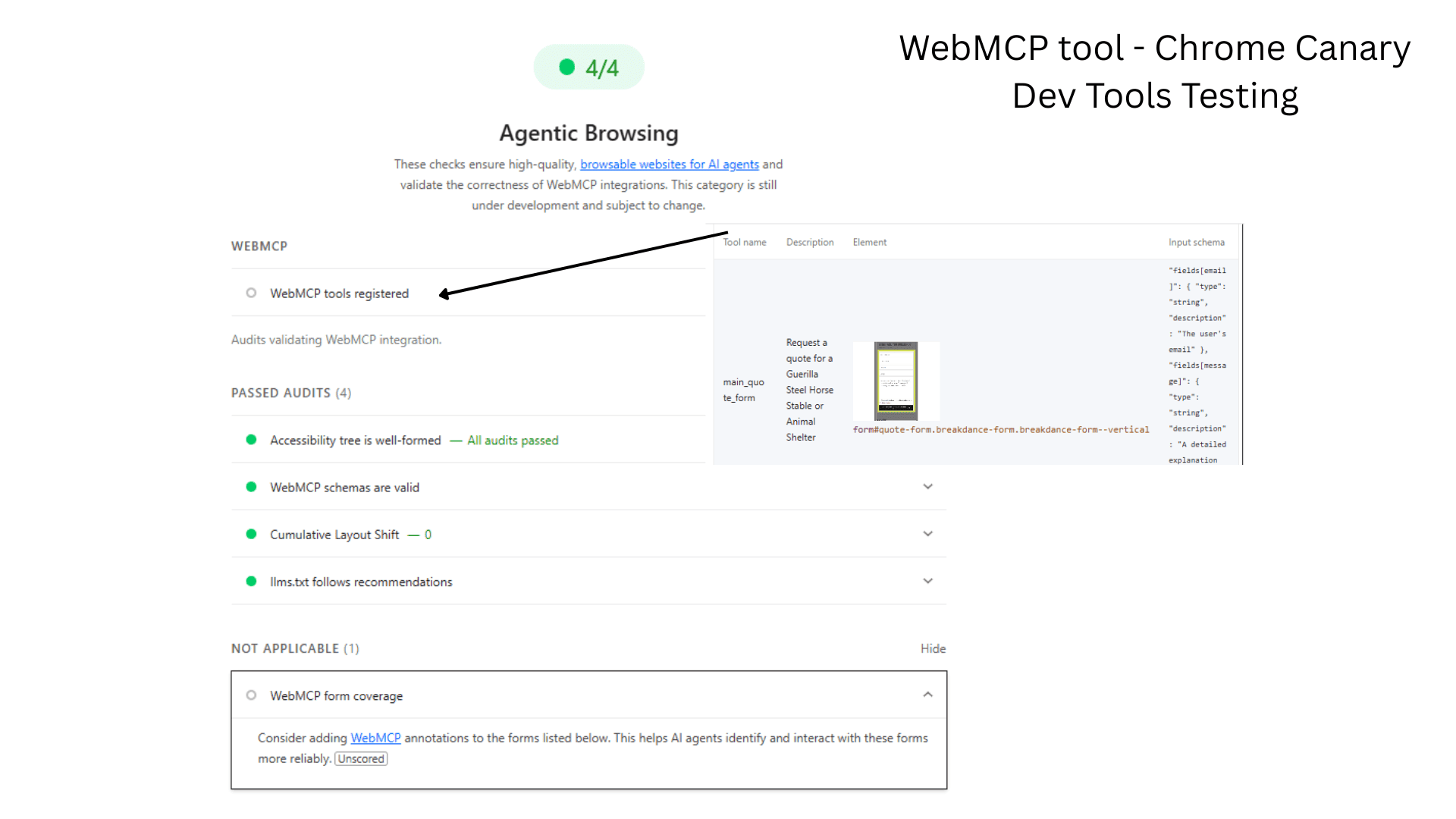
Very quickly the forms started appearing as registered tools inside the Agentic Browsing audit.
But that wasn’t enough. Because there were still weird little issues floating around.
The JavaScript Cleanup Crew
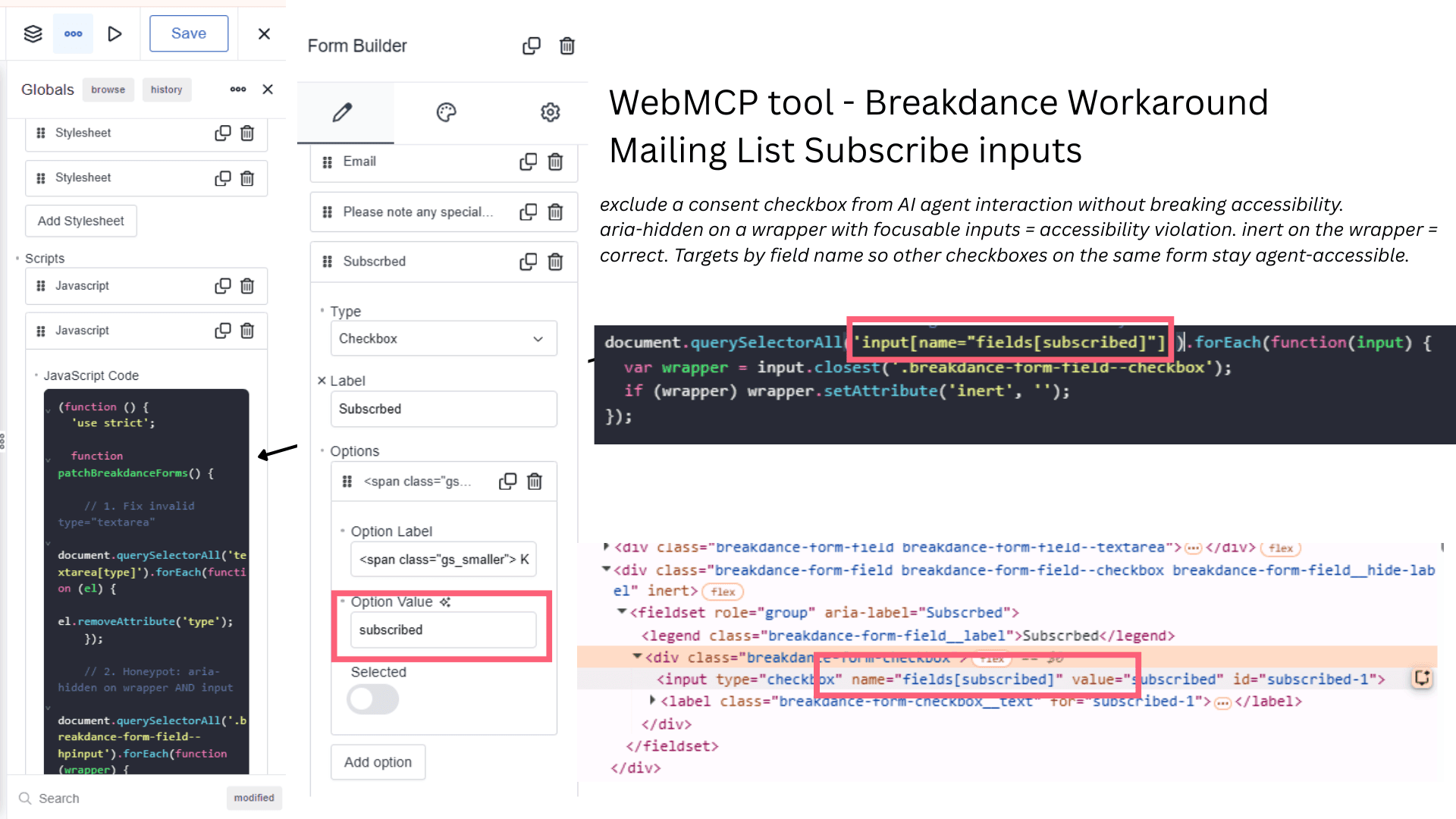
This became the second workaround. A small global patch script added in breakdance global js input. Its job was mostly cleaning up the things I couldn’t do in the standard Breakdance form, like:
Removed invalid type="textarea" attributes
Applied aria-hidden to honeypot wrappers and inputs
Removed orphaned aria-describedby references
Namespaced popup form IDs to stop collisions
Normalised URLs before submission
Removed tool registration from duplicate popup forms on the contact page
Cleaned up some visual side effects from the attribute injection trick
The honeypot and checkbox fields were interesting these remain “WebMCP schemas are invalid ” For the honeypot initially I hid the wrapper but it still failed. Then I added the aria-hidden to actual input but it still failed validation in lighthouse.
Although it did pass “WebMCP tools registered” for both forms and the agent filled it.
Field-level exclusion just doesnt seem to be in the spec yet
Field-level exclusion just doesnt seem to be in the spec yet. There is no clean workaround that satisfies all hp requirements simultaneously WebMCP schema clean, spam protection intact, not a hidden field.
The spec advises against negative toolparamdescription directives, but the only current option is a positive instruction: toolparamdescription=”Leave this field empty” or similar.
In agent testing the field was submitted as empty string “” which is the correct behaviour. A human/spam bot fills it, AI agent leaves it empty, Breakdance’s server-side check works – schema isn’t clean but real world functionality is intact.
Only fields with input=”hidden” seem to be excluded.
I left it there for the moment
Then I Let Gemini Loose On It
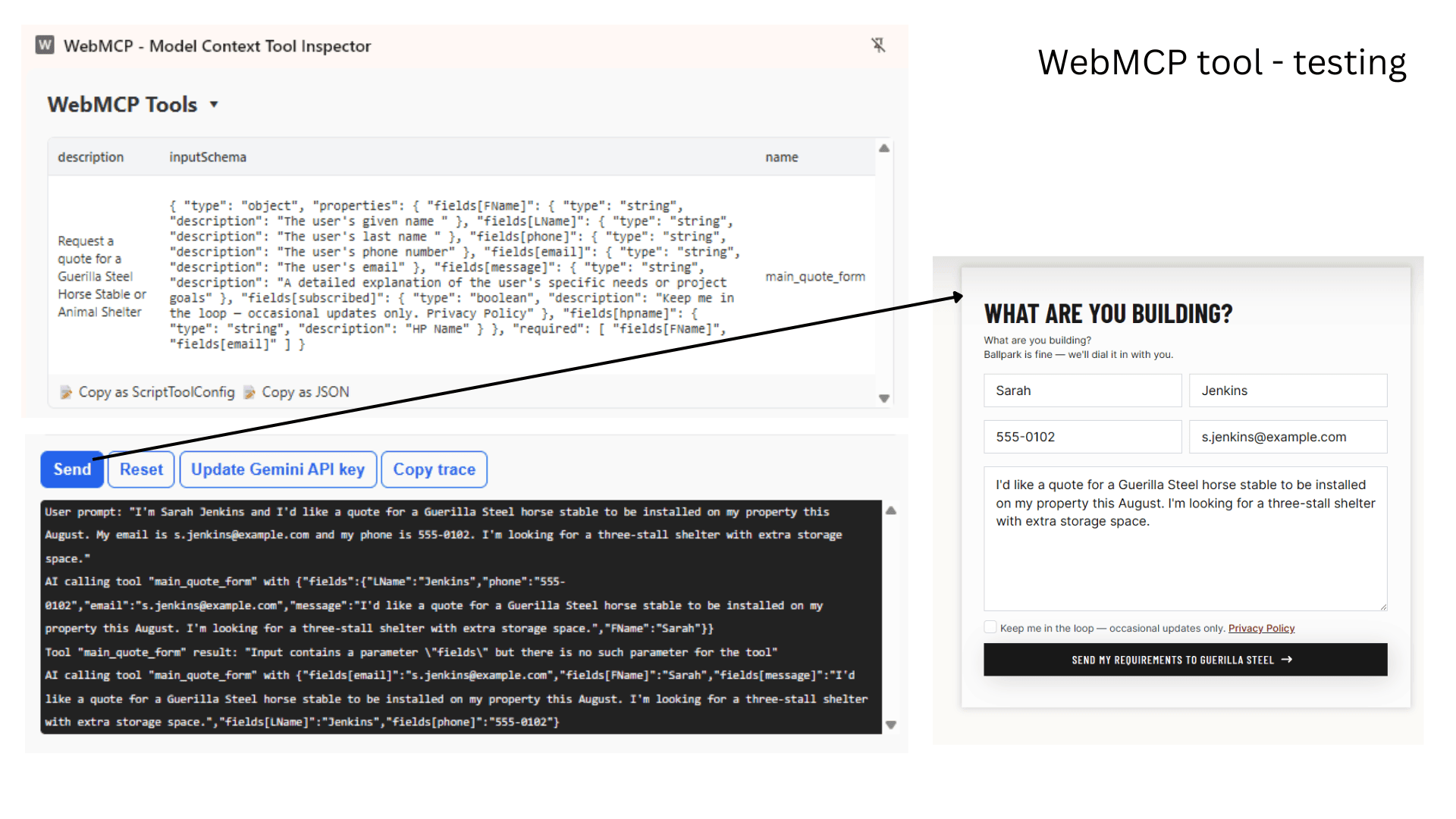
I used Chrome’s MCP Tool Inspector with Chrome Canary and let Gemini try using the forms.
The agent discovered both forms immediately. It read field schemas correctly.
On the first attempt it got the url input validation structure wrong and missed the https:// prefix on a url input. I updated the toolparamdescription to explicitly instruct that the prefix should be included.
Second attempt, Everything mapped correctly into Breakdance’s fields[x] structure and the form filled perfectly. but no submission? what was wrong? I took a further look at Google WebMCP instructions and learned that chrome intentionally stops the process before submission and asks the user to confirm.
I was a little disappointed but then thought about form submission spam and figured that it was probably the right call – I don’t particularly want AI agents firing contact forms across mine or my clients sites without somebody approving it.
I’m ready for AI, but my tools are still catching up.
One Lighthouse schema warnings still remain. The issues are tied to constraints inside Breakdance’s form output and fixing them means introducing PHP output filters, a little extra js running on every page that needs to access forms (or rebuilding/altering the form component or waiting for breakdance to catchup).
The checkbox field – Im still working on it – but this webMCP approach is new and will likely becoming the new standard on updated releases and until then our patch will hold and while not symatically perfect its agent ready.
Here are the steps to implement WebMCP on a Breakdance form
Name the tool (Form HTML ID)
Form Builder → Advanced → Form HTML ID → quote-contact-form” toolname=”main_contact_popup_form”tooldescription=”Contact Brighter Websites to enquire about website and seo services
Add submit param (Submit HTML ID)
Form Builder → Advanced → Submit HTML ID → quote-contact-form-submit” toolparamdescription=”The action trigger to transmit the form data to the server
Configure form input fields – Add field params + autocomplete
Configure Input fields: Form → Feilds → (text) Input Field → Placeholder input → First Name ” toolparamdescription=”The user’s given name Form → Feilds → (text) Input Field → Autocomplete → given-name Repeat for all visble fields
For Check/Select Boxes add to the options (you don’t need them on the label or field set) but these field types still fail.
Add global JS patch to handle nuances and honeypot fields.
toolparamdescription on each individual checkbox input ✓ already present
toolparamdescription on the parent <fieldset> via JS patcher
aria-describedby on checkbox inputs pointing to their <legend>
aria-label on each checkbox input combining option text + group name via JS patcher
None of the above cleared the validation warning.
What we know
The schema generated seems valid and complete. All the checkbox groups appear correctly in the input schema as typed arrays with enum values and titles. The agent testing tool successfully fills all checkbox fields across multiple prompt scenarios. The warning doesn’t really affect real-world agent behaviour.
My best guess is Lighthouse is looking for something specific on the first input of each group that the current WebMCP spec documentation doesn’t clearly define for checkbox/radio patterns. (I’m a bit annoyed the only checkbox example is for a single checkbox, and following the select box examples doesn’t seem to work). So I’m stuck!
Select and Radio inputs are not patched in the JS code provided.
I don’t really use them much so the workaround set doesn’t cover the <select> dropdowns or radio button fields. The patterns should translate across but if you’re implementing on forms with those field types, copy the relevant patcher sections and ask your preferred AI to adapt for your specific markup.
If you need patches specific to a particular form just drop it in a code block on the page rather than running it globally.
Share and contribute
If you crack this one, please share. Full implementation code and these docs are on GitHub link
Drop your fix in the Breakdance Facebook Group or tag me and I’ll update the docs.
and then the real Agentic Browsing Issue hit me.
If somebody’s AI assistant visits your website and can’t understand how to contact you, the enquiry doesn’t magically persist through determination and goodwill. It goes to a website was easier to understand – so its a discoverability, accessibility and emerging standards problem.
but yes I got the forms working – gemini could discover and fill them – Technically speaking, the it worked. But right at the end I realised I wasn’t really fixing forms. and I had a much bigger question:
What does contact form architecture look like when websites are being used by AI agents instead of just humans?
Because humans browse and Agents appear to task-complete. And suddenly a whole pile of things I’d never really thought about until after this, become apparent…
Where and how is AI finding the location of the forms? LLMs.txt?
If the same enquiry form appears globally across dozens of pages, is that ok, should I not use global forms if they appear on a specific service intent page?
How much page context does an agent actually use when deciding which form to interact with?
Does tool naming become part of SEO?
What happens when multiple forms overlap semantically but are needed for humans? I hate errors even if they are warnings for deliberate reasons. So if I have a short quick form that is for convenience, just humans at that conversion moment it might not NEED to be agent friendly.
Are we eventually designing websites with a human interaction layer and a separate agent interaction layer?
What does this mean for conversion design?
I honestly don’t know yet and that is my next rabbit hole.
Update on Making Forms Agentic with check boxes
4/6/2026
WebMCP Checkbox Test: How agents read option values vs labels
Test setup: Checkbox group with deliberately mismatched labels and values:
Label (visible)
Value (submitted)
412
55
67
780
891
13
234
445
999
48
Fieldset toolparamdescription: “Select the option closest to the user’s favourite number”
No toolparamdescription on individual checkbox inputs.
Test 1 without explicit instruction to fill the field
Prompt included favourite number but no direct instruction to select from the list.
I’m Alex Smith and I need help regarding a flight and hotel I’m looking at for July 15th, 2026, as well as a strange transaction I noticed on my statement from May 28th. Please contact me at alex.smith@email.com or 555-0198; my favorite number is 999 and I’d like to subscribe to your newsletter.
Result: field not filled at all. Agent ignored the checkbox group entirely.
AI calling tool "Contact_Form" with {"fields[phone]":"555-0198","fields[Favnumber][]":["48"],"fields[fname]":"Maru","fields[subscribed]":true,"fields[email]":"m.smith@email.com","fields[lname]":"Smith","fields[message]":"I need help regarding a flight and hotel I'm looking at for July 15th, 2026, as well as a strange transaction I noticed on my statement from May 28th."}
Finding: Without explicit instruction referencing the field, agents skip checkbox groups even when a fieldset description exists.
Test 2 with explicit instruction
Prompt: “please select the number closest to my favourite number from the list… my favourite number is 50”
Closest by label = 67
Closest by value = 48 (label: 999)
User prompt: “please select the number closest to my favourite number from the list I’m Maru Smith and I need help regarding a flight and hotel I’m looking at for July 15th, 2026, as well as a strange transaction I noticed on my statement from May 28th. Please contact me at m.smith@email.com or 555-0198; my favorite number is 50 and I’d like to subscribe to your newsletter””
Result: Agent submitted "48" screenshot confirmed label 999 was ticked.
AI calling tool "Contact_Form" with {"fields[phone]":"555-0198","fields[Favnumber][]":["48"],"fields[fname]":"Maru","fields[subscribed]":true,"fields[email]":"m.smith@email.com","fields[lname]":"Smith","fields[message]":"I need help regarding a flight and hotel I'm looking at for July 15th, 2026, as well as a strange transaction I noticed on my statement from May 28th."}
Finding: Agent reasoned from const values, not title/label text.
Earlier testing with toolparamdescription on options value (using the options value to add) reliably triggered selection without explicit user instruction
What this likely means for toolparamdescription placement for checkboxes:
toolparamdescription on the fieldset with multiple checkboxes alone is not enough, agent needs explicit instruction in the user prompt to fill checkbox groups
Agents reason from const values in the schema, not the visible label (title)
Option values likely should be semantically meaningful, “standard size 4m x 4m build” not internal codes like 4x4 or 5x4 because the agent uses the value itself to make decisions in the absense of toolparamdescription
toolparamdescription on individual checkbox inputs reliably trigger selection without explicit user instruction
toolparamdescription placement for checkboxes:
Placement
Result
Fieldset only
Agent skips checkbox group unless explicitly instructed in prompt
Individual inputs
Agent fills correctly without explicit instruction
Both
Individual input descriptions take precedence
Subscribe to our blog or get in touch.
Get in touch with with Vanessa. Your Ballarat website strategist, designer and developer.
Occasional emails from Vanessa at Brighter Websites about AI, SEO, Website Marketing for regional service businesses.
See what we have done
More Articles
Discover more expert insights to the latest Web Design and SEO trends, these curated blog posts are designed to broaden your horizons and spark your imagination.